Can your design system go dark by Friday?
16 October 2026
A design system that lives only in Figma looks great until someone asks for a new brand or for dark mode. Notes on building one out of variables, where design and code read the same values, and how it saved a project when new white labels and dark mode arrived with almost no development time.
A Figma file is not a system
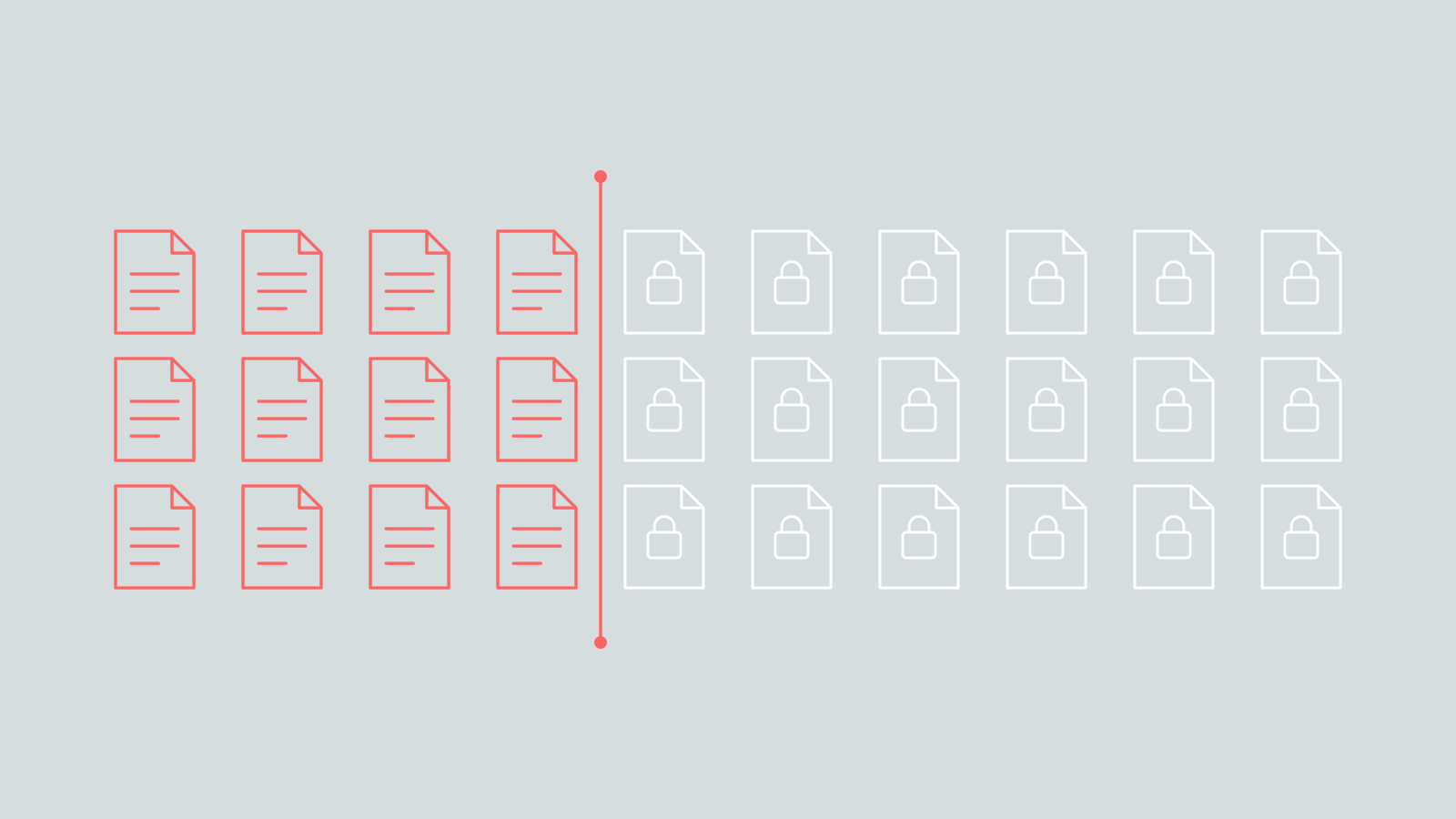
Every few months someone proudly shows me their design system. A Figma library with three hundred components, a Notion page called "Principles" and a Storybook nobody has opened since the intern left. Beautiful. Then I ask one simple question: "Cool. Can you make it dark by Friday?"
Silence. Then: "Well... we'd have to go through all the screens."
And that's the moment you realize it's not a system. It's a very well organized collection of screenshots. A design system is only a system when changing one decision changes the product, in design and in code at the same time. And the cheapest, most boring and most underrated way to get there is variables.
Few primitives, everything else derived
Every color, shadow and corner in an interface is a decision. A design system stores those decisions as design tokens, an idea that came out of Salesforce's design system team¹, and in code they become variables. The trick is not to have variables. Everybody has variables. The trick is to have very few of the ones you actually choose:
- Primitives, the decisions:
--color-primary,--color-success,--color-neutral, a couple of radiuses. This is the only layer a brand, a client or a theme ever touches. - Derived tokens, the consequences: every tint, hover state, border and shadow, calculated from a primitive instead of picked by hand.
- Components, the consumers: a button, a tag, a tile. They read tokens and never contain a single hex code.
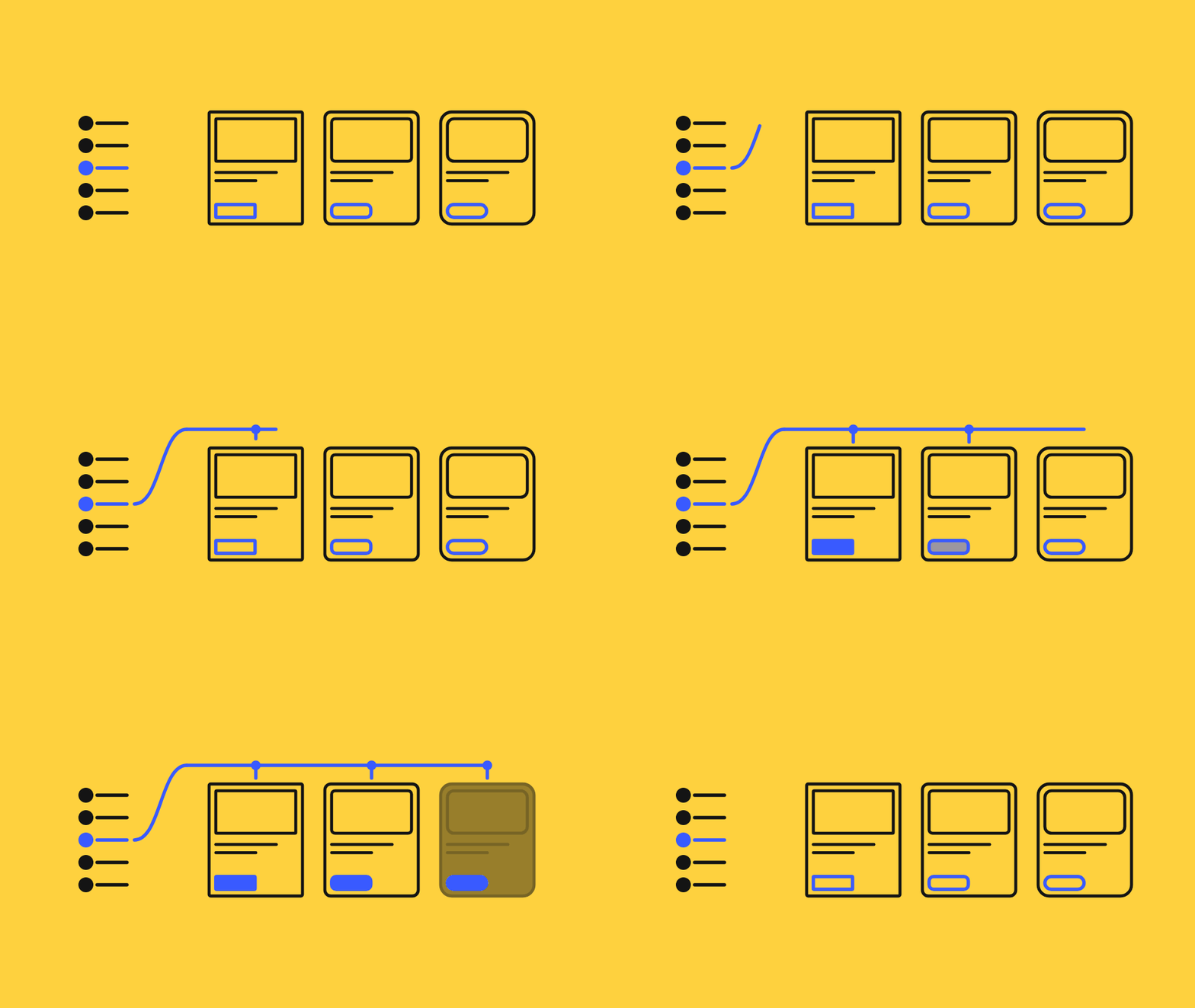
Change a primitive and everything downstream follows. Pick a "slightly lighter blue" by hand, and congratulations, you now maintain two blues...
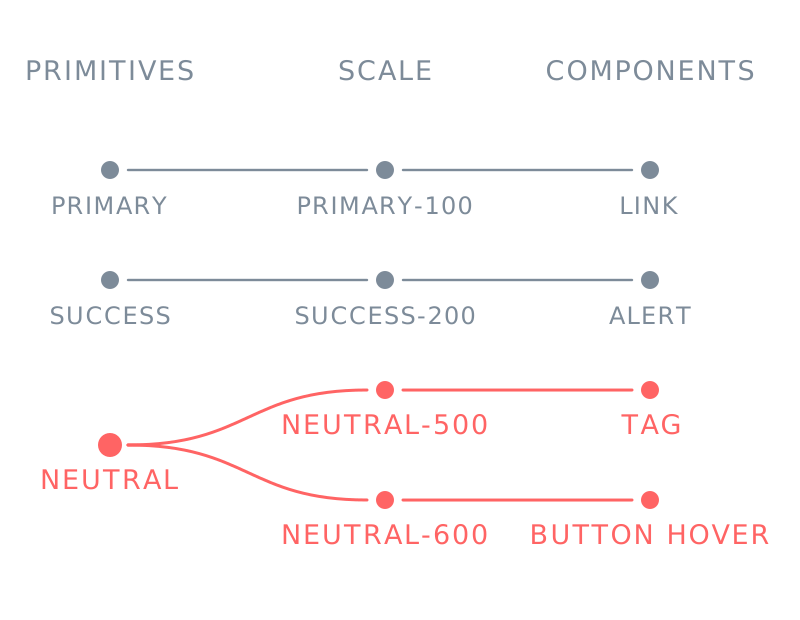
/* Primitives: the only values that change */
:root {
  --color-primary: #2d4275;
  --color-success: #1f8a4c;
  --color-neutral: #5d6470;
  --color-surface: #ffffff;
  --color-shade: #ffffff;   /* what every step is mixed with */
}

/* Shade steps: how much of the shade color goes in */
:root {
  --shade-1: 10%;
  --shade-2: 20%;
  --shade-3: 30%;
  --shade-4: 40%;
  --shade-5: 50%;
  --shade-6: 60%;
}

/* The scale: every step mixed from one primitive.
   The same scale exists for success and neutral. */
:root, .dark-mode {
  --color-primary-100: color-mix(in srgb,
    var(--color-primary), var(--color-shade) var(--shade-1));
  --color-primary-200: color-mix(in srgb,
    var(--color-primary), var(--color-shade) var(--shade-2));
  --color-primary-300: color-mix(in srgb,
    var(--color-primary), var(--color-shade) var(--shade-3));
  /* ...up to --color-primary-600 */
}

/* Components use steps, they never pick */
.tag {
  color: var(--color-primary);
  background: var(--color-neutral-500);
}

.button:hover {
  background: var(--color-neutral-600);
}
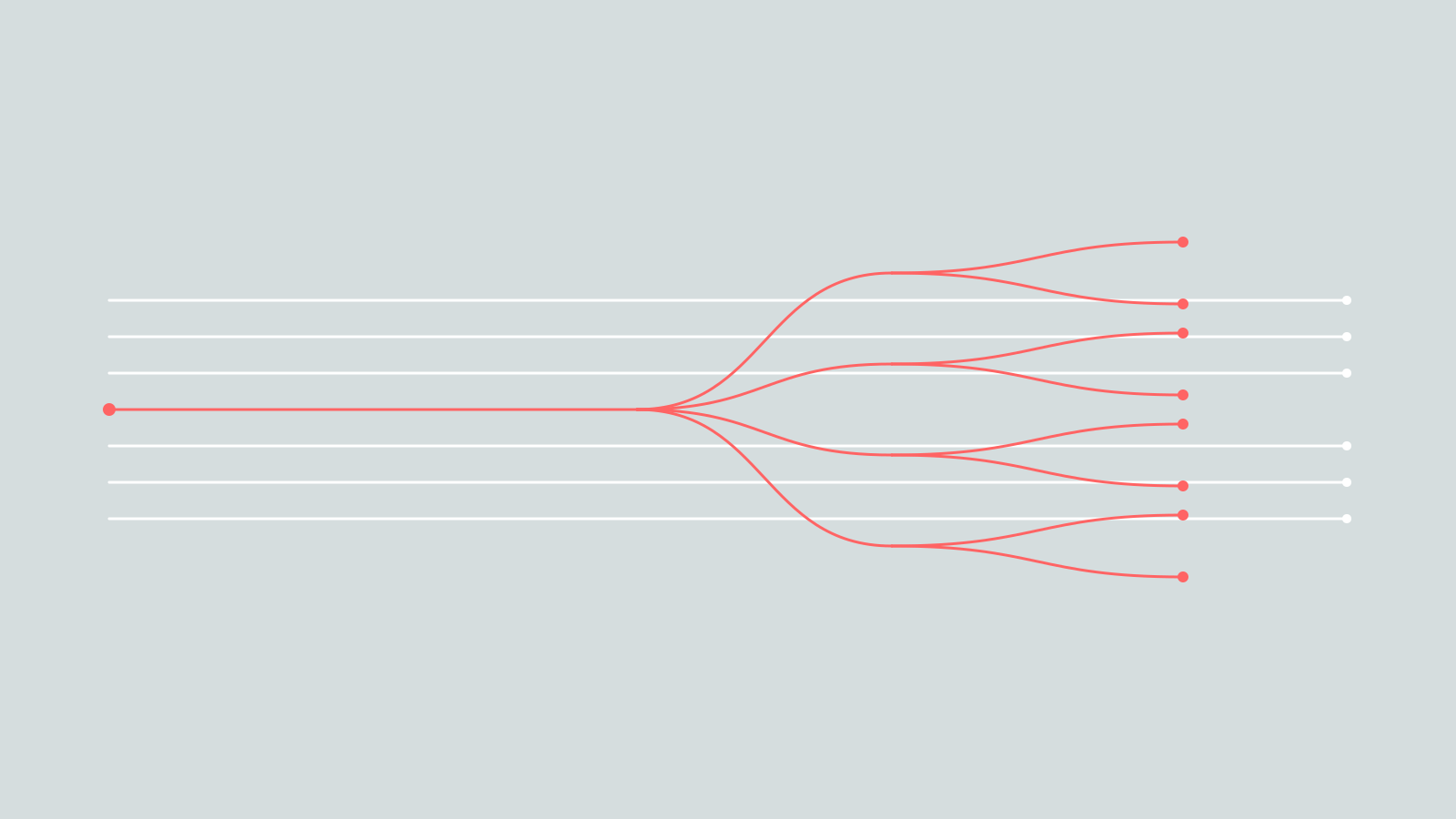
One primitive, a whole scale of steps.
Name the job, not the color
The most expensive mistake in a token set costs nothing on day one: naming. --white, --blue, --dark. It looks perfectly logical, until dark mode arrives and suddenly --white is a dark navy and --dark is almost white. Ups...
I've seen codebases like that (fine, I've written one 🙃). It works and the users don't care, but every new developer who reads color: var(--white) on a black background quietly questions their career choices.
Name tokens after what they do (--color-primary, --color-success, --ui-radius) and a theme can change every single value without any name becoming a lie.
The DRIVE story
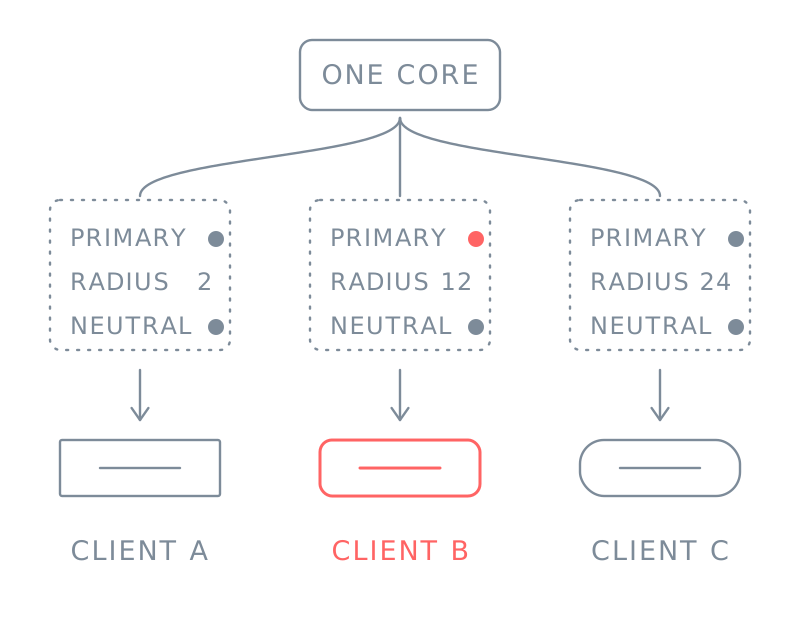
DRIVE is a knowledge-sharing and upskilling platform for industrial companies, one of Voith's digital ventures, where I was a founding member in 2019. It's sold as white-label instances: the same platform in the client's brand. By November 2022, it ran 21 white-label instances with roughly 8,000 active users.
Like half of the internet, the platform started on a modified Bootstrap. Every new white label got its own extra stylesheet that overwrote the core Sass classes with the client's colors, fonts and corners.
One client, fine. Five, manageable. After that, every deploy became a lottery: a fix in the core broke an override somewhere, an override broke a module nobody tested, and nobody could say for sure what a button looked like on which instance. Instability, inflexibility and unpredictable behavior, as I politely put it in the project documentation.
And then a customer said...
"Yeah, our brand uses dark mode. lol".
New white labels had to go live fast, and right behind them came the request every designer loves and every developer fears: dark mode. For everything. With really limited resources and the development time.
Rewriting the components was out of the question. There was no time to touch the markup of more than twelve modules, and honestly, there was no need. The components were never the problem; the problem was where they got their values from. So instead of adding one more layer of overrides, we took the values out of the overrides.
What we actually did...
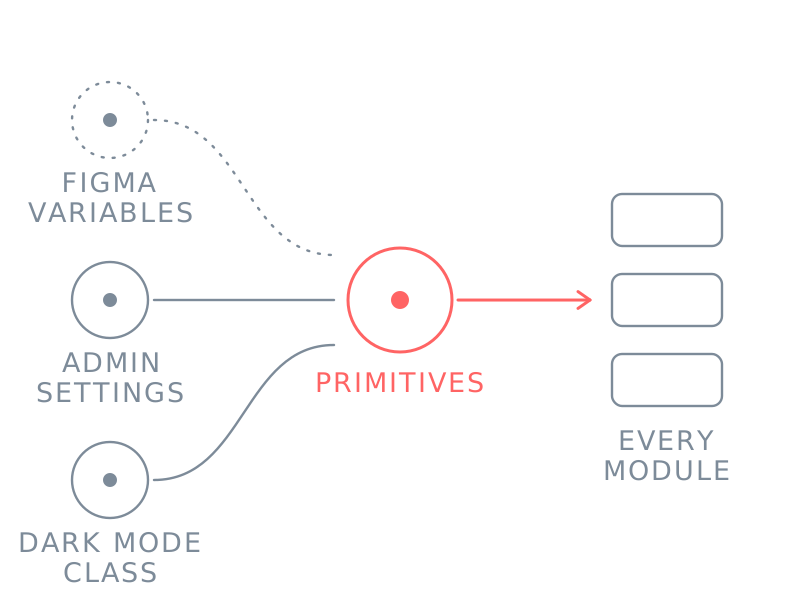
First, I designed the whole system with Figma variables. Then we moved it into the code, step by step:
- Primitives. We went through all the components and made a list of the primitives they really needed.
- No more hex. Every static hex code was replaced with a variable:
--color-primary,--color-success,--color-neutraland friends. - Shades.
color-mix()mixed every primitive with a shade color, in steps set by shade variables (10%, 20%, 30%...). That gave every color its own scale,--color-primary-100to--color-primary-600, and nobody had to pick a single step ². - Shadows. Elevation became variables too:
--shadow-dr-1,--shadow-dr-2and so on. - Corners. Two radius variables:
--ui-radiusfor tiles and the interface, and--element-radiusfor buttons, inputs and selectors. - Propagation. All of it went through the whole system, module by module.
- Dark mode. A
dark-modeclass on the body replaced the primitives. Nothing else. - Admin panel. A settings page where the instance admin replaces a few primitives. Hit save, and the platform turns into nearly any design guideline and style.
:root {
  --shadow-color: #1b2233;
  --ui-radius: 12px;      /* tiles, panels */
  --element-radius: 8px;  /* buttons, inputs */
}

/* Like the color scale, declared where the
   .dark-mode class can reach them */
:root, .dark-mode {
  --shadow-dr-1: 0 1px 3px color-mix(in srgb,
    var(--shadow-color) 16%, transparent);
  --shadow-dr-2: 0 4px 12px color-mix(in srgb,
    var(--shadow-color) 18%, transparent);
  --shadow-dr-3: 0 12px 32px color-mix(in srgb,
    var(--shadow-color) 22%, transparent);
}

.tile {
  border-radius: var(--ui-radius);
  box-shadow: var(--shadow-dr-1);
}

.button,
.input,
select {
  border-radius: var(--element-radius);
}
Shadows and corners, also just variables.
A scale nobody picks
Here's the part that does the heavy lifting. The 100 to 600 steps aren't colors, they're recipes: a primitive, a shade color and a percentage. Components only ever ask for a step (--color-neutral-500), never for a hex code.
So when the admin saves a new primary, the whole scale is recalculated, and every tag, hover and border follows. When dark mode replaces the primitives, the same thing happens. Same names, same code, a new set of colors, and nobody designed a second palette.
A hand-picked palette of 10 blues, on the other hand, needs another 10 blues for dark mode. Then another 20 for the next white label. That's how you discover 47 slightly different blues in production.
One catch the tutorials skip: a custom property that uses var() is resolved where it's declared, and its children inherit the result, not the recipe. Declare the scale on :root only, put the dark-mode class on the body, and the scale keeps its light-mode colors forever. Declare it on the element with the theme class as well (:root, .dark-mode), and it follows.
/* Dark mode: the same names with new values */
body.dark-mode {
  --color-primary: #8ea3d6;   /* navy on #121212 is 1.9:1, this is 7.5:1 */
  --color-neutral: #aab1bd;
  --color-surface: #121212;
  --shadow-color: #000000;
}

// The theme follows the system, and changes when the system does
const system = window.matchMedia("(prefers-color-scheme: dark)");
const setDark = (isDark) => document.body.classList.toggle("dark-mode", isDark);

setDark(system.matches);
system.addEventListener("change", (event) => setDark(event.matches));
Dark mode replaces the primitives. Nothing else changes.
Dark mode isn't inverted light mode
You can't just swap black and white and call it a day. Take a real pair of brand colors from DRIVE's documentation: a navy primary (#2D4275) and a cyan secondary (#02E5E5).
On white, navy text has a contrast of 9.8:1, well over the 4.5:1 that WCAG asks for normal text ³. On a near-black surface, the same navy drops to 1.9:1. It practically disappears. Cyan does the opposite: 1.6:1 on white, which is useless for text, and 11.9:1 on dark.
That's why dark mode has to replace the primitives, not only the backgrounds. The primary becomes a lighter navy (7.5:1), or the job goes to the cyan. Material Design's dark theme guidance says the same in its own words: dark grey surfaces instead of pure black, and lighter, desaturated colors instead of the saturated light-mode ones ⁴.
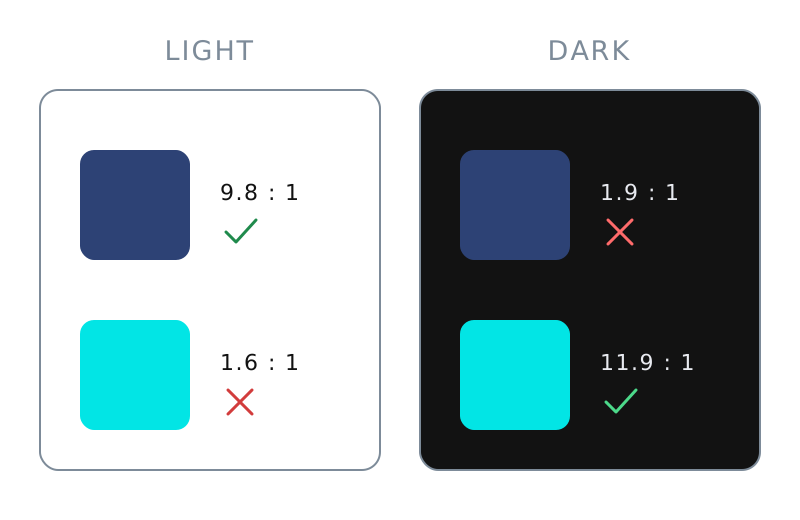
Same brand, same colors, opposite jobs.
// The admin replaces a few primitives.
// Every module already reads these names.
function applySettings(s) {
  const root = document.documentElement.style;
  root.setProperty("--color-primary", s.primary);
  root.setProperty("--color-neutral", s.neutral);
  root.setProperty("--ui-radius", s.uiRadius + "px");
  root.setProperty("--element-radius", s.elementRadius + "px");
}

applySettings({
  primary: "#2d4275",
  neutral: "#5d6470",
  uiRadius: 12,
  elementRadius: 8,
});
What a Save in the settings page boils down to.
Two details hiding in those lines
Decide who wins. The client's colors live on the root, the dark mode values on the body, and the body wins. Great for contrast, bad news for a client whose navy just vanished in dark mode. So every setting a client can change needs a dark value too, typed in or derived (a color-mix() with white goes a long way).
Print it, don't paint it. In production, the saved values should be printed by the server into a <style> tag in the page's head, and the theme should be set by a tiny script there too. Otherwise the page renders in the default brand and the light theme, then flashes into the right ones. Clients notice. Their CEOs notice faster.
One source of truth, or two sources of lies
The variables in the code are only half of the system. The other half is the design file, and if the two speak different languages, they drift apart within a sprint. Designers ship a new grey, developers ship a different new grey, and both are sure theirs is the right one.
No fancy pipeline is needed to avoid it. DRIVE's system was designed with Figma variables, where a light and a dark value can live under the same name thanks to modes ⁵, and the code used the same names: primary in Figma is --color-primary in CSS, element radius is --element-radius. The shared names are the contract. When a designer and a developer say "primary", they finally mean the same thing.
What I'd tell my younger self
- Find the primitives first. Go through every component and list what it really needs. It's always fewer than you think.
- Derive, don't pick. One primitive and a few shade steps beat a hand-picked palette of 40 blues.
- Treat a hard-coded hex as a bug, and hunt them down before anyone asks for dark mode.
- Decide what's configurable, and design everything else to be neutral. White labels break in the gap between the two.
- Put the system where the product is: in the code. The design file documents it; the code is it.
Final thoughts
Nothing in this story is rocket science. Variables are older than most of the frameworks that hide them. But a design system built on them changes the conversation: a new white label stops being a project and becomes a settings page, and dark mode stops being a redesign and becomes a class on the body.
So, can your design system go dark by Friday? If the answer is "we'd have to go through all the screens", you don't have a design system yet. You have a very nice Figma file.
References
- Jina Anne in "What are design tokens?", Smashing Podcast, episode 3, Smashing Magazine (November 2019).
- MDN Web Docs, "color-mix()", developer.mozilla.org.
- W3C, Web Content Accessibility Guidelines (WCAG) 2.1, Success Criterion 1.4.3 Contrast (Minimum) (2018).
- Google, "Dark theme", Material Design guidelines (Material Design 2).
- Figma Help Center, "Guide to variables in Figma", help.figma.com.