Title
DRIVE EdTech Platform
Description
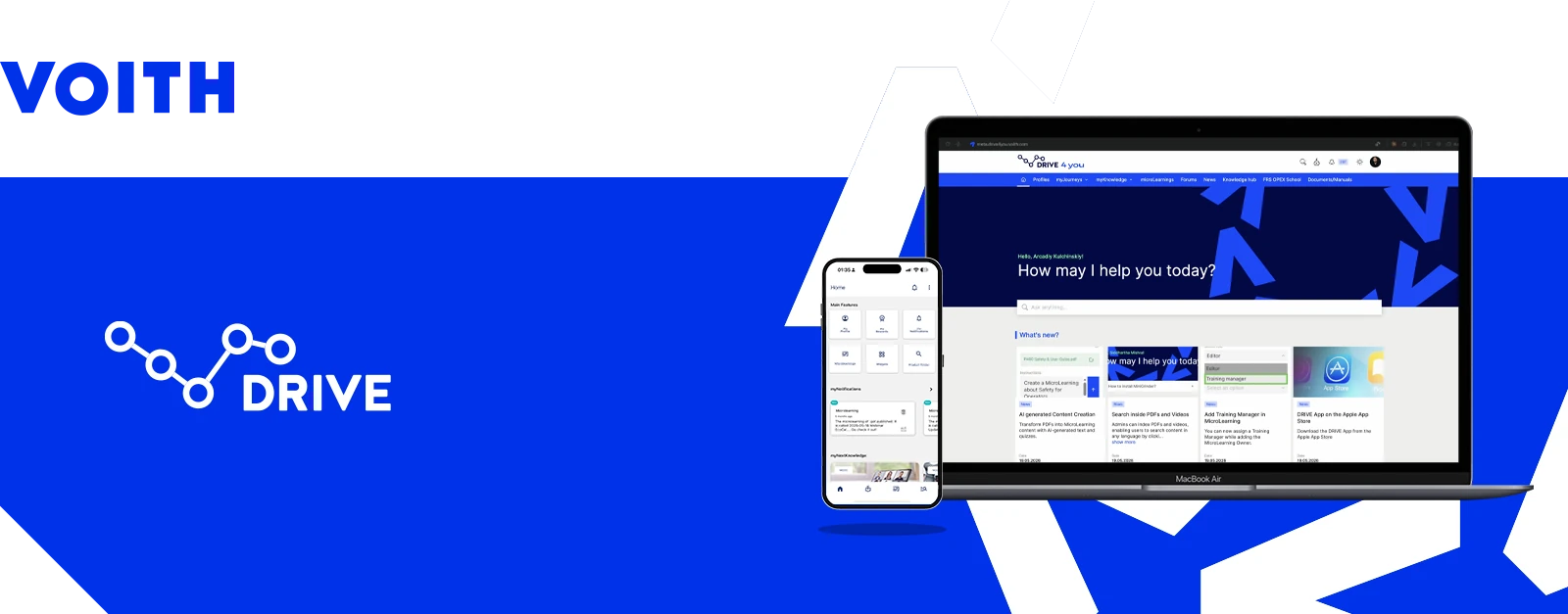
DRIVE is a B2B2C SaaS EdTech platform for upskilling and knowledge sharing in industrial and technological companies, developed within Voith's Digital Ventures. It serves about 25,000 active users across 15 white-label client instances.
Role
Lead Product Designer,
Design Engineer
Team
Mobile team of 3,
web team of 5
Resources
Miro, Adobe XD, Figma
Technologies
sCSS, HTML, Git
Year
2019 - Present
Client
VOITH
At a glance
Lead Product Designer and Design Engineer of DRIVE since its founding in 2019. I own the roadmap, the design system and the AI layer, and lead a cross-functional team of nine.
What is DRIVE
DRIVE is a B2B2C SaaS EdTech platform with a strong focus on upskilling and knowledge sharing, designed for industrial and technological companies and developed within Voith's Digital Ventures. It is sold as white-label instances and today serves about 25,000 active users across 15 white-label client instances.
What is Voith
The Voith Group is a German multinational industrial corporation, founded in 1867. Its main business branches are the paper industry, machinery and technical equipment manufacturing, hydropower plants, IoT solutions, and digital industrial solutions.
Structure
Structurally, DRIVE is a digital platform constructor focused on knowledge sharing, designed as a configurable, flexible barebone that offers a wide spectrum of modules. It is sold as a white-label instance, and also as a pseudo-white-label integrated into the main DRIVE instances.
To show my contribution to DRIVE as Lead Product Designer, this page covers seven of its parts: the Flexible Design System, the DRIVE Proxy Card Object, the Microlearning module and builder, AI on DRIVE, Immersive Learning Journeys, Chat and Ask the Expert.
Me 😎
I joined DRIVE in May 2019 as a founding member and I am its Lead Product Designer, owning the full product lifecycle from discovery to delivery. I own the roadmap and lead a global cross-functional team of nine design and development professionals within an Agile / OKR framework. My work covers research, UX, UI, the design system, the platform's modules and its AI layer.
DISCLAIMER
Due to the confidential nature of the contractual agreement,
sensitive documentation, including research details, is hidden or described only briefly.
🤐
Flexible Design system
DECISION
Every value is a variable. Components use named color scales, never raw values, so a client theme changes a handful of primitives, and labels invert on their own when an accent fails contrast.
EVIDENCE
White-label setup went from about a week of manual stylesheet work to 15 to 30 minutes, with fewer CSS bugs and a more consistent layout across all 15 client instances.
The problem
The DRIVE stylesheet was based on a modified Bootstrap framework. Each white-label instance was modified with extra CSS that overwrote the original sCSS classes to reflect the owner's design language. The result was instability, inflexibility, and unpredictable behavior on every development deploy. Preparing a new white label took about a week of manual stylesheet rewriting.
Research
The research covered design systems, the white-label owners' corporate design guidelines (and what they all have in common), and a structural analysis of DRIVE. As a result, we had a clear picture of the structural fixes the platform needed, the design tokens to turn into variables, and the design choices to make for non-variable tokens.
Definition
The DRIVE Flexible Design System addresses the challenges above. As its barebone principle, it uses the Atomic Design method.
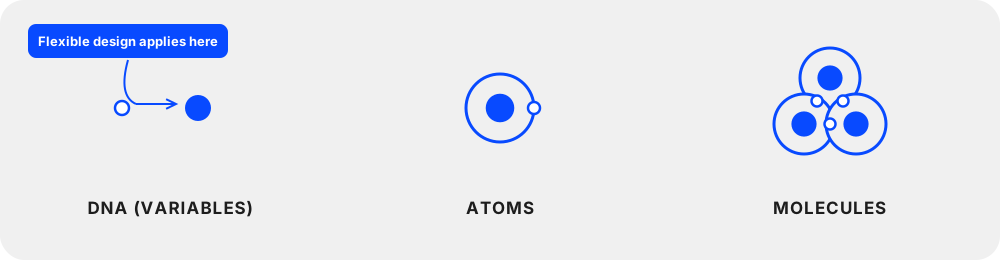
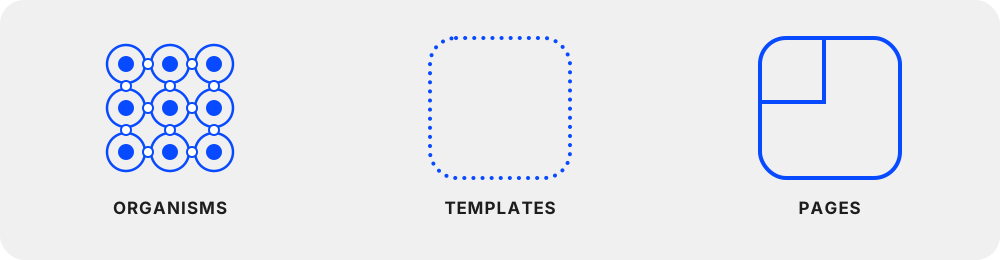
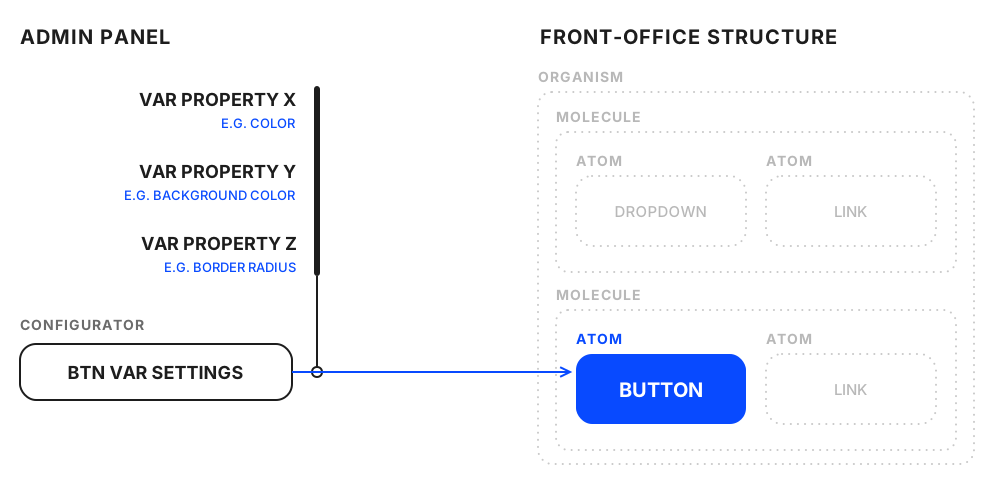
The objective is to make the look of key UI elements configurable, so white-label issues are kept to a minimum. A code-free settings page in the Administration panel is the center of the design system's configuration. The DRIVE Flexible Design System transforms itself to match the white-label owner's design language.

FLEXIBILITY
A configurable design system that transforms smoothly into most design languages.

MANAGEABILITY
The instance owner can change the key aspects of the design system without code.

NEUTRALITY
Non-flexible tokens are designed to be neutral, so they don't interfere with the configured design language.

CONSISTENCY
Design tokens are consistent across the whole GUI, so the experience is intuitive and clear.
The concept
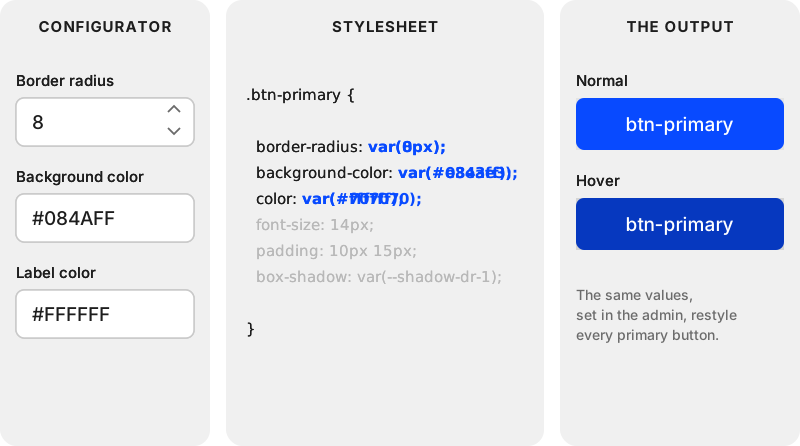
The configuration happens in the instance's administration panel, which lists the key atoms (e.g. buttons, forms) that can be modified. Each atom has its own set of settings for its look and feel. Once configured, the platform changes the CSS through the variables applied to each property.
From variables to modules
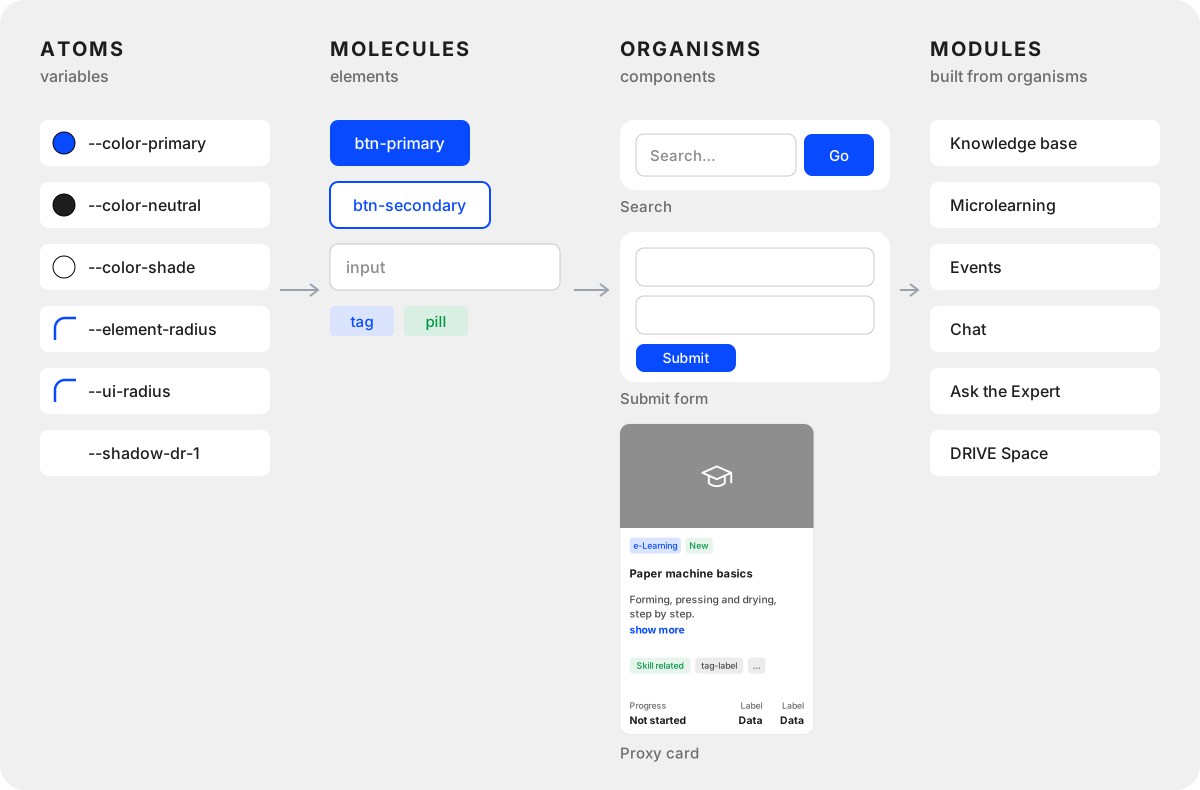
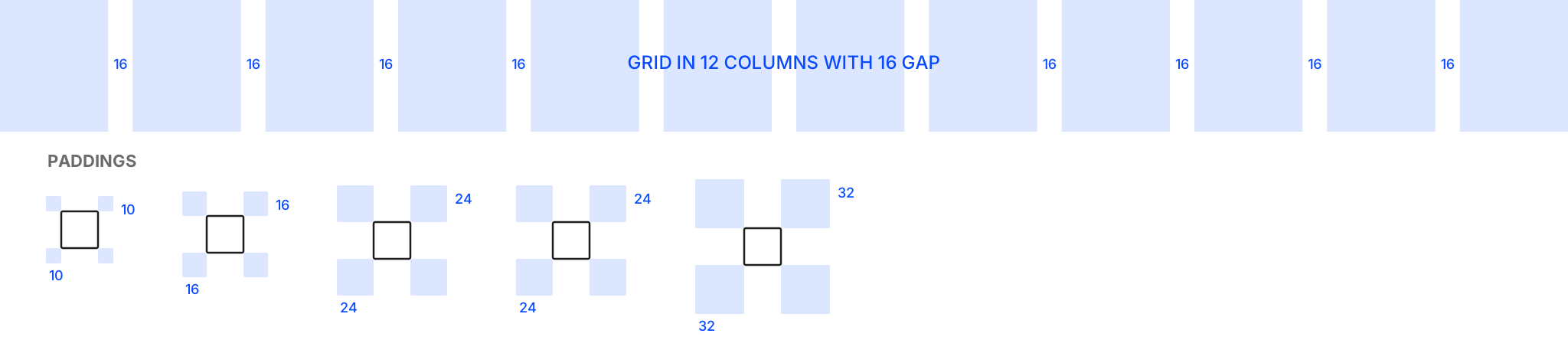
The atoms are variables: primitives such as the primary, neutral and shade colors, radii and shadows. They are introduced into elements, the molecules, such as btn-primary and btn-secondary. The elements compose organisms such as Search, the Submit form and the Proxy Card, and the organisms build every DRIVE module.
One scale for every color
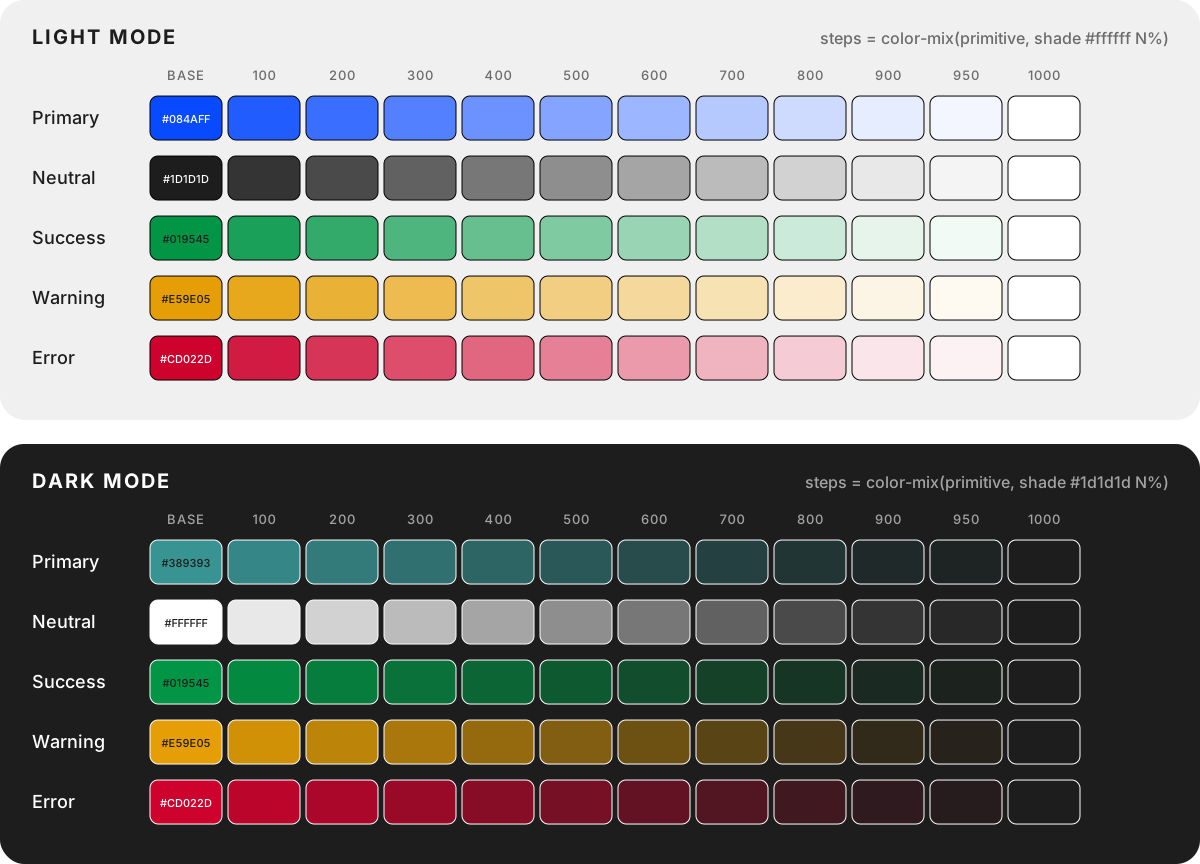
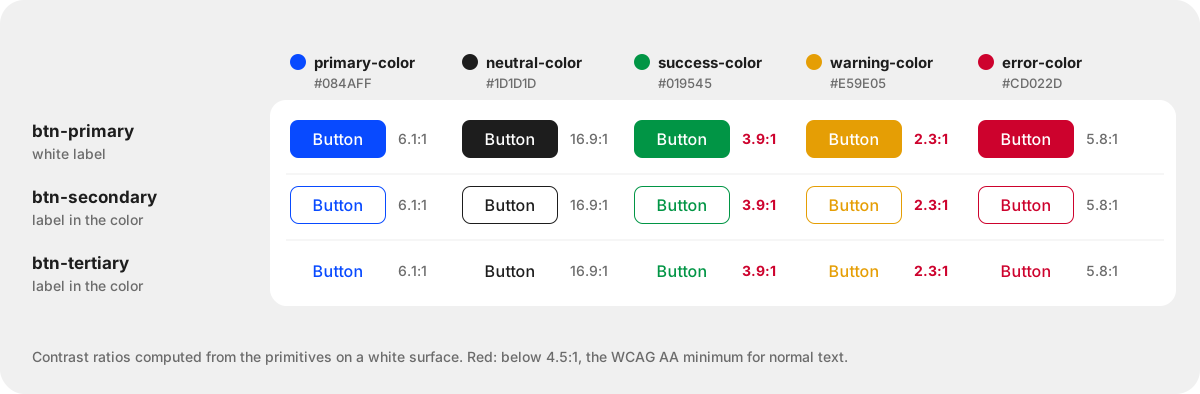
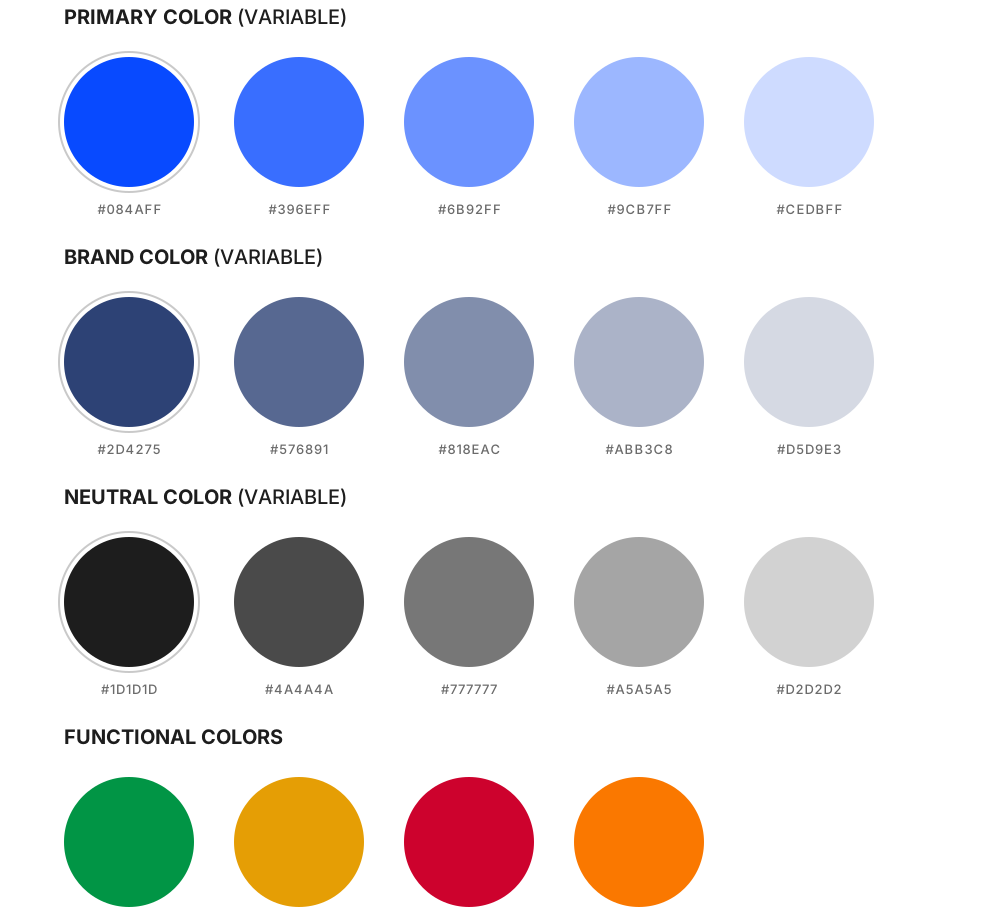
Every static hex value was replaced with a variable. Each color primitive (primary, neutral, success, warning, error) gets a named scale from 100 to 1000, and every step is the primitive mixed with a shade color in a fixed proportion:
--color-primary-100: color-mix(in srgb, var(--color-primary), var(--color-shade) var(--shade-1));Here --shade-1 is 10%, --shade-2 is 20%, and so on. The shade is white in light mode and near-black in dark mode, so the same formula gives lighter tints in one and deeper tones in the other. Components only use the scale, such as var(--color-neutral-500), never raw mixes, so changing one primitive re-colors everything built from it. Dark mode swaps the primitives and the shade, and nothing else.
Labels that keep their contrast
Some accent colors chosen by white-label owners didn't have enough contrast with the label color. We added a function that inverts the label for these colors, so buttons and badges stay readable whatever accent an owner picks.
Foundations
STRUCTURAL
COLOR
TYPOGRAPHY
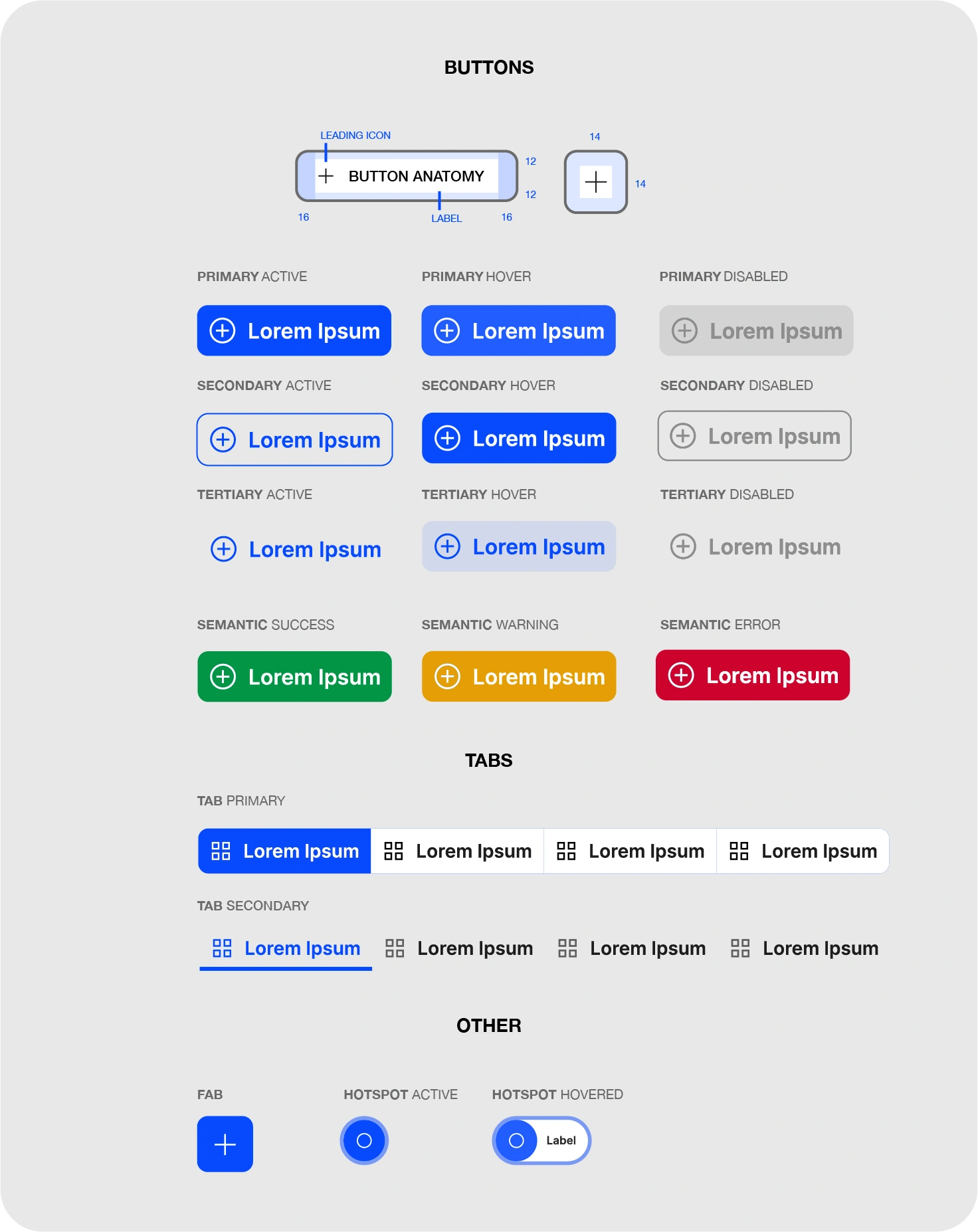
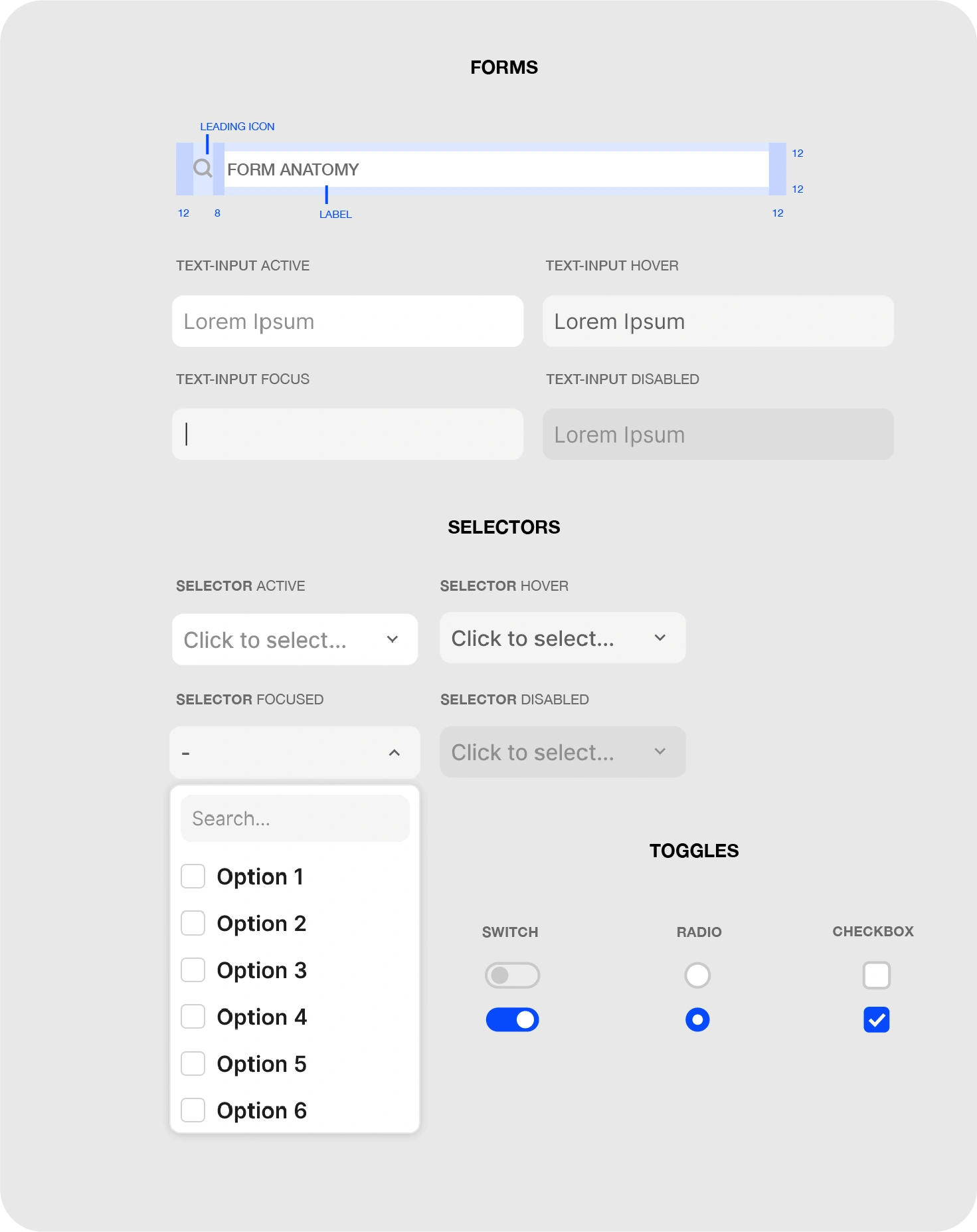
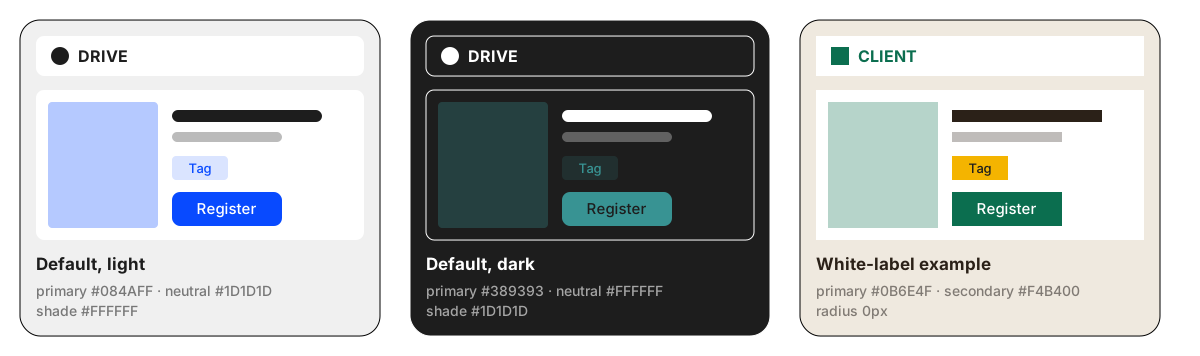
Outcome
Preparing a white label went from about a week of manual stylesheet rewriting to 15 to 30 minutes in the admin settings, into nearly any design style. The platform has fewer CSS bugs and a more consistent layout, and it is faster to design and to develop, which made each white label cheaper to prepare.
DRIVE Proxy Card Object
DECISION
One shared card object for every module, built from a single piece of code, instead of a separate card per module. Each module fills it with its own metadata, status and actions.
EVIDENCE
Shipped and used on every DRIVE instance, in each module directory and in the related-content component anywhere on the platform.
The problem and the definition
DRIVE is home to more than 12 different modules to date, each offering a different experience, carefully architected into a similar structure (Module Directory > Module Objects > Module Components) and assigned platform-wide metadata (topics, tags, libraries and audiences) so they integrate seamlessly with each other.
For modules to communicate with each other, and to allow mixing objects from different modules into a single 'related' directory component 1 (e.g. on DRIVE Space 2), we needed a way, both in back-end programming and in the user experience, to integrate modules and their objects with each other.
Research
A Venn diagram analysis was conducted to understand the similarities in the modules' metadata and actions. Then a session was held with a group of users who use all available DRIVE modules to prioritize actions and metadata using the MoSCoW method. The input was sorted into generic, specific and left out. Afterwards, a lo-fi prototype was built to validate the conclusions with three focus groups representing the regular users of the "Knowledge base", "Microlearning" and "Event manager" modules. After fine-tuning, HMW and LCA brainstorming took place with the development team to agree on the technical approach. Finally, a set of user flows was created (generic and module-specific) and validated with the focus group using contextual inquiry.
1 Related Directory component is a flexible aggregator component that can be added in the DRIVE page builder. It shows object cards from different modules in a single row, based on the module reference and metadata.
2 DRIVE Space is an on-demand, theme-scoped container that takes over the instance (including the header and footer) for users in a specific audience, showing only the selected modules and the objects relevant to the space's theme.
Prototype
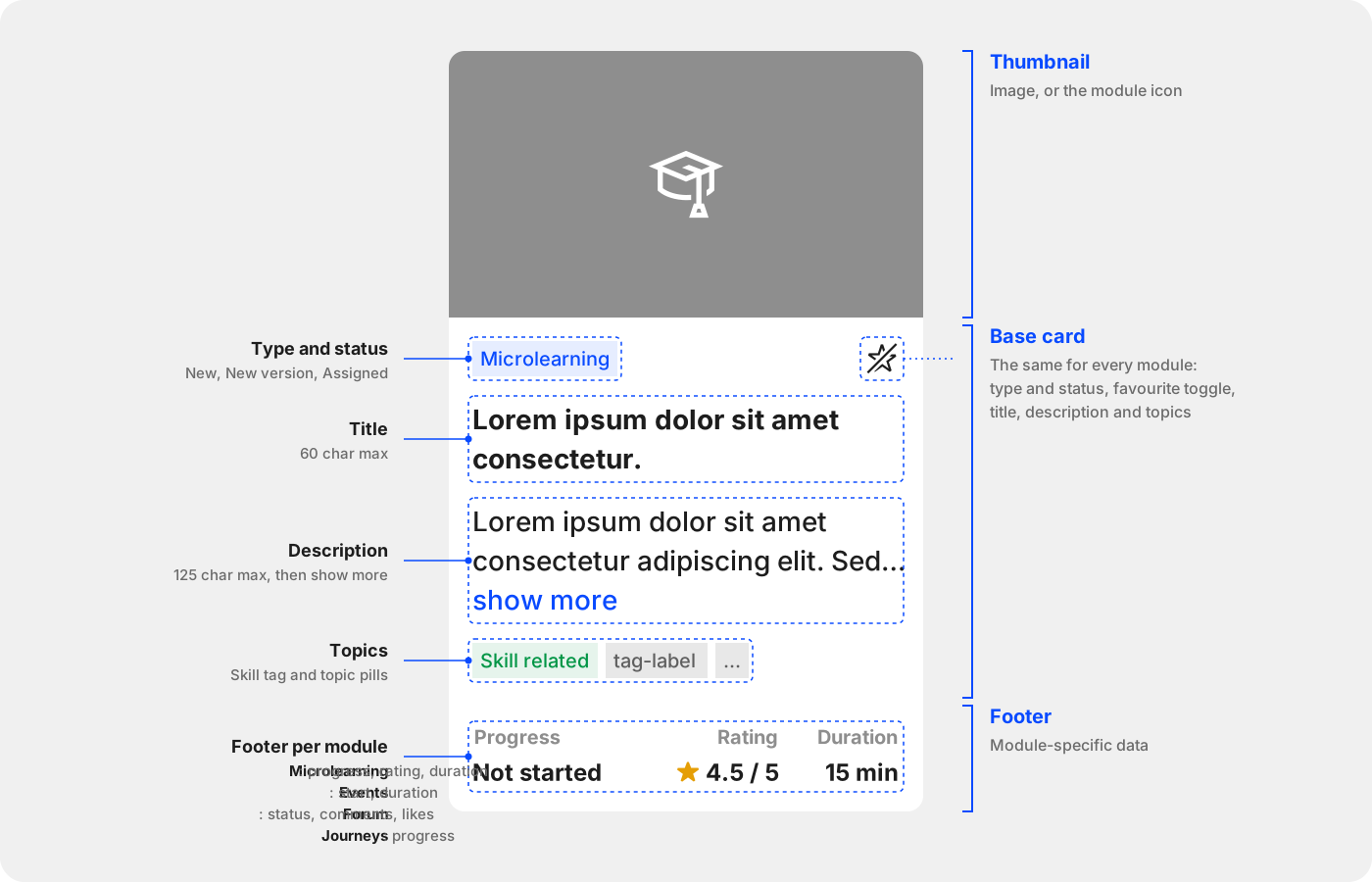
As an outcome, the DRIVE Proxy Card Object was conceptualized. It is a generic, independent, dynamic object shared by all modules, built from a single piece of code. It serves as a proxy: a passthrough to a module's object that retrieves the object's selected functionality.
It takes the form of a card divided into three sections: base card, footer, and post-footer. The card shows generic information, such as title, description, state and topics; module-specific details, such as author, company, time scope, price and rating; and functionality, such as registering, feedback, approval and managing.
As a generic proxy object, it can be generated inside a specific module's directory page and in the aggregator component anywhere in DRIVE. It adapts to the object's metadata, status and functionality for both users and managers.
Microlearning module
Microlearnings is one of DRIVE's modules, a micro LMS designed to let users create digital trainings easily, even without the skills to use mainstream LMS tools. It has all the options needed to create, configure and manage learnings, and to monitor their consumption and get reports.
DECISION
A component-based builder for authors who are not LMS specialists: chapters with a focus mode for assessments, AI on five component types, moderator review before publishing, and minor or major versions with release notes.
EVIDENCE
Shipped and used on every DRIVE instance, with 20 components in three groups: content, resources and knowledge assessment.
Structure
The microlearnings module has three dimensions: the directory, where the cards (DRIVE Proxy Cards) are gathered and organized by category, and where users search, filter and select the right microlearning; the microlearning object, where learners see the microlearning's metadata and content organized by chapters, quizzes and a discussion board; and the microlearning builder, a component-based learning builder with enough components and tools for authors to express themselves, from content creation to knowledge checks with quizzes, and to follow progress through the public discussion component.
Research
The microlearnings module is built around four personas: the off-site expert, the on-site expert (at the factory), the learner, and the moderator. The research explored the full potential of micro knowledge sharing, to give users enough features to create a learning quickly and easily, and to manage, monitor and consume it. Focus groups backed each persona, combined with a number of research procedures, to build a deep understanding of what creators and consumers need from the experience.
The builder
A microlearning can be simple or split into chapters, each with its own type and focus. Authors can add language versions, save minor and major versions (before a preview, the author saves either a minor version, such as 1.1, or a major release, such as 2.0, with release notes), and set the owner, metadata, instructional details, visibility and settings in the preferences. The builder offers 20 components in three groups: content, resources and knowledge assessment.
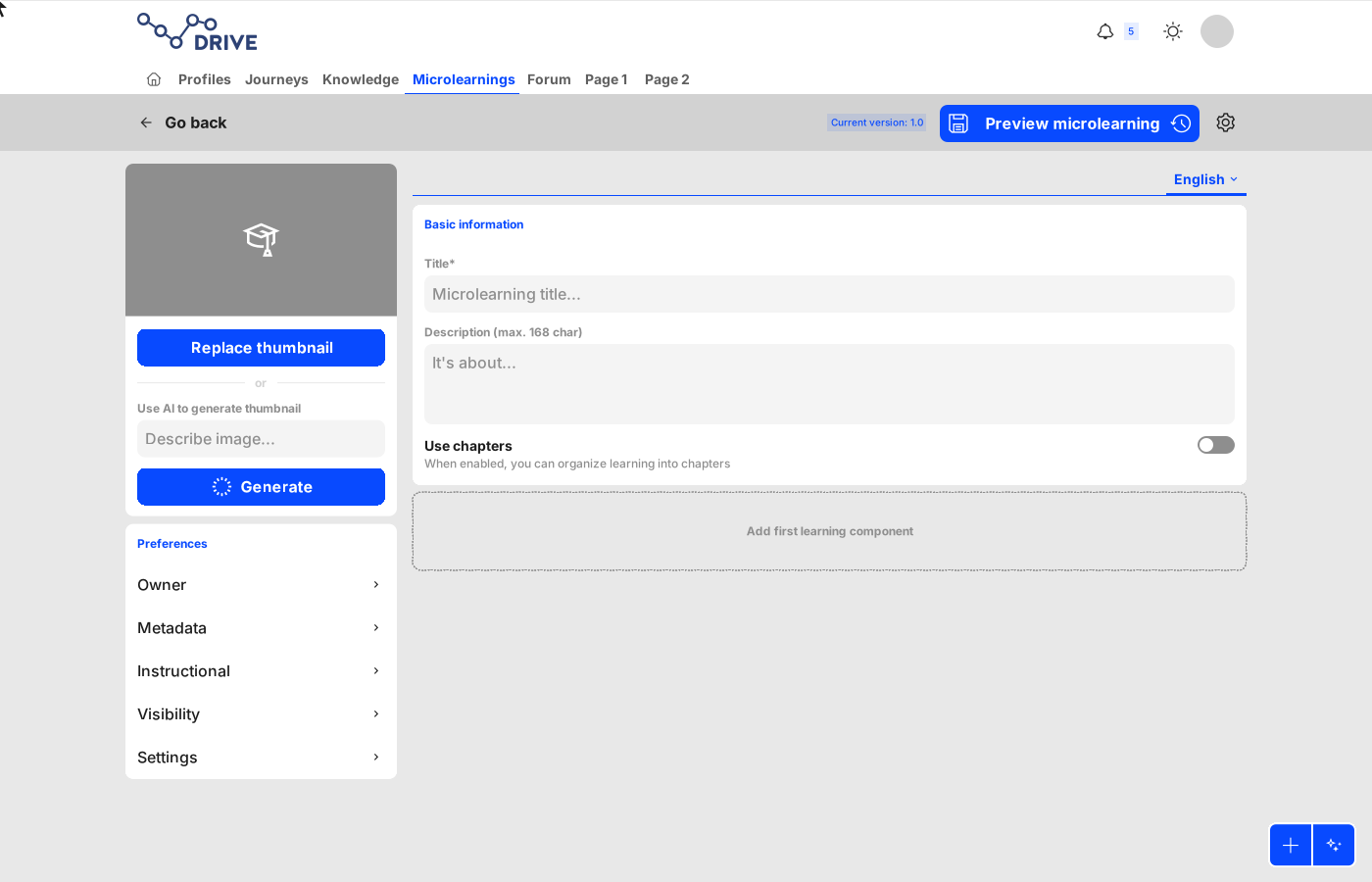
Chapter-scoped video component
One example of the components in the microlearnings module is the chapter-scoped video component. It lets the author upload a video and split it into chapters. When enabled, the learner sees a list of labels and timecodes next to the player. Clicking a chapter jumps the video to the marked time.
Video hotspots
The same video component can carry hotspots. At a set moment the video pauses and hotspots appear on the frame; each opens a short note, and the learner continues watching when ready.
Collaborative text component
A text component is the most straightforward tool for sharing ideas and knowledge. The one built for DRIVE's microlearnings also gives authors a richer experience, with collaboration features: several authors can write and moderate the content at the same time and comment to each other, on the whole text or on a specific part of it. Text can be written by hand or generated with AI and refined on request, with a notice that AI content should be verified. Authors can make long text collapsible, let learners mark it as completed themselves, and show their comments to learners.
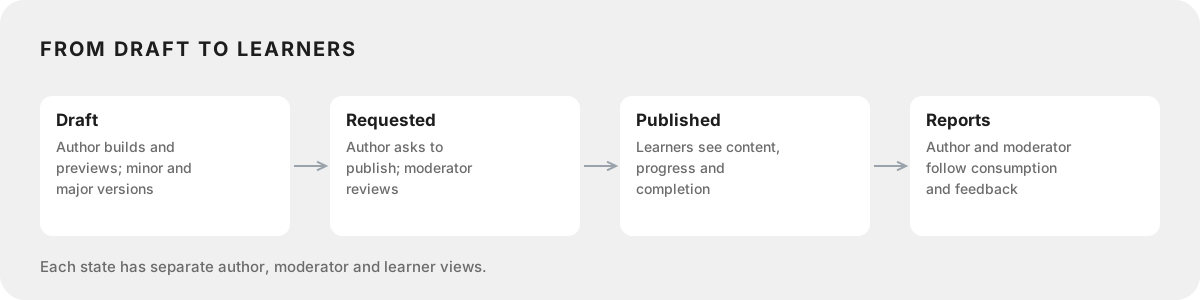
From draft to learners
A microlearning moves from draft to a publishing request, which a moderator reviews, then to published, and finally to reports on consumption and feedback. Authors, moderators and learners each have their own view of every state.
AI on DRIVE
Since August 2026, DRIVE has a RAG (retrieval-augmented generation) index that learns and vectorizes all learnings, documents, SCORM packages and knowledge on the platform. Users can also upload external documents for the system to learn from. One index powers two features, AI microlearning creation and Global RAG search. My part was the strategy of the logic, the implementation roadmap, the UX definition and the UI.
DECISION
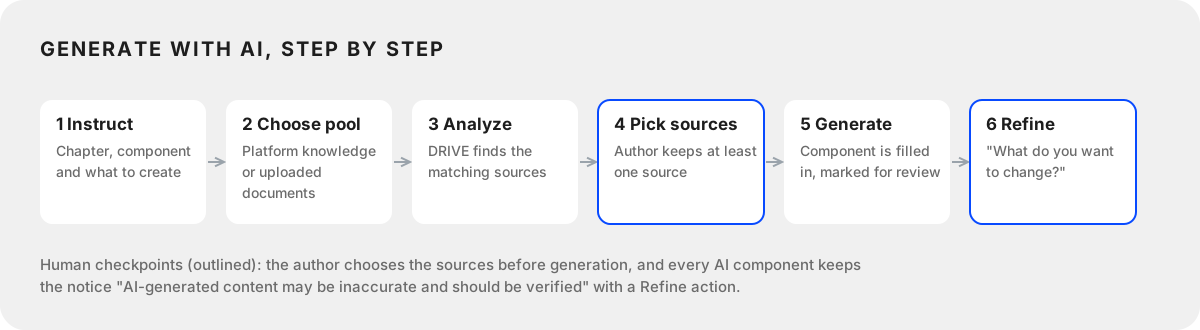
One RAG index over all DRIVE content feeds both course creation and search. The author picks the sources before anything is generated, and every generated component is marked as AI content to verify.
EVIDENCE
Live since August 2026. Course creation went from days of manual work to about an hour.
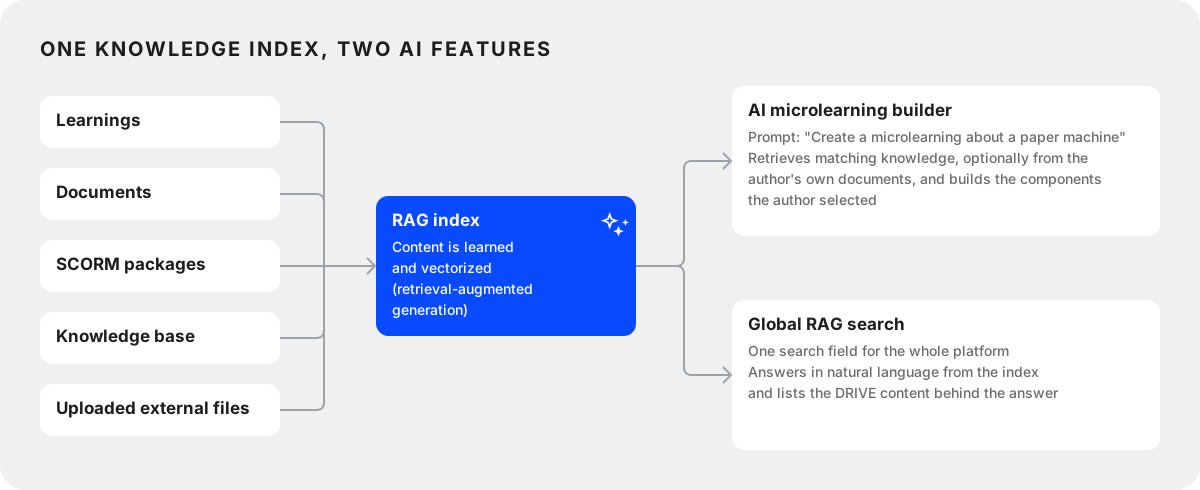
AI microlearning creation
The author writes a prompt, for example "Create a microlearning about a paper machine". DRIVE retrieves the matching knowledge from the platform, plus any documents the author uploads, and creates the components the author selected. It cuts course creation from days of manual work to about an hour. The author picks the sources before anything is generated, every generated component is marked as AI content to verify, and it can be refined with a follow-up instruction.
Global RAG search
One search field for the whole platform. It answers semantically, as a natural conversation, from the RAG knowledge, and lists the DRIVE content behind the answer: knowledge cards, microlearnings, forum threads and journeys.
Immersive Learning Journeys
In Immersive Learning Journeys, users see a 360° feed of the factory, look around, zoom and move between locations, and learn through floating hotspots pinned to points in the scene. Each hotspot opens a different kind of content in a popup, such as microlearnings, videos and SCORM courses, as well as documents, links, audio, forum threads and chat.
DECISION
Hotspots are pinned to points in the 360° scene, not to the screen, and one popup pattern opens every content type: microlearnings, videos, SCORM courses, documents, audio, forum threads and chat.
Chat
Chat is a community feature built from the ground up to enable platform-wide discussion and user interaction. The initial request was to enable individual and group chats and to integrate the feature with the events module, the learning journey module, and a chatbot assistant.
DECISION
The chat is one floating button on every page, and Digi, the AI assistant, answers in the same chat with links that open the right place in DRIVE.
EVIDENCE
Two focus groups validated the flow and the hi-fi prototype; their feedback added file sharing and an expandable window. Shipped and used on every DRIVE instance.
Research
Benchmark research on popular chats helped us understand usability habits and compare chat features.
Concept
The concept was defined with the stakeholders (Product Owner, developers, designer, and the requesting client's representative) using the Lean Coffee approach.
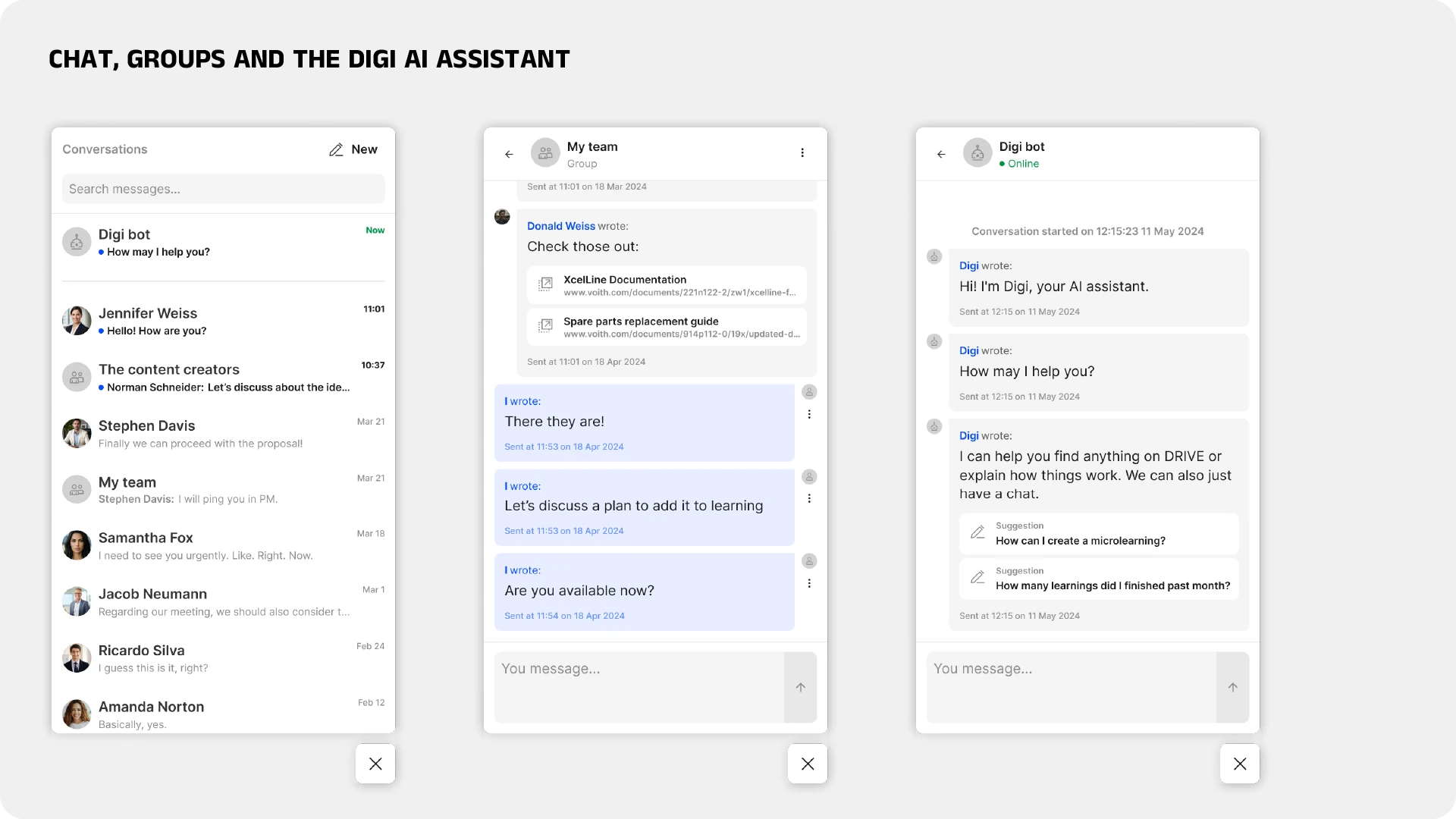
The chat is available at a glance, through a FAB fixed to the lower right corner of the viewport. When a new notification arrives, it shows a dot. On hover, the collapsed FAB expands to show the number of new messages. On click, the chat modal opens in its default state, the chat list. Clicking a conversation changes the modal to the message board, and the '+' symbol changes it to a contact list. From there, users start a conversation by clicking a name, or switch the group toggle to select several users and start a group chat.
The resulting user flow was validated with a non-technical focus group for missing actions and overall scope. Then hi-fi prototypes were built, and another focus group tested their usability.
Based on the feedback, new features were analyzed: file sharing in the chat, and expanding the chat window for better immersion. Both were added to the prototype and sent to the development pipeline.
Groups and Digi
Group chats have a name, an admin and members, and a chat can be set to end after a set time. Messages show DRIVE links as cards. Digi, the AI assistant, lives in the same chat: it greets the user by name, offers preset replies and answers with link cards that open the right place in DRIVE.
Ask the Expert
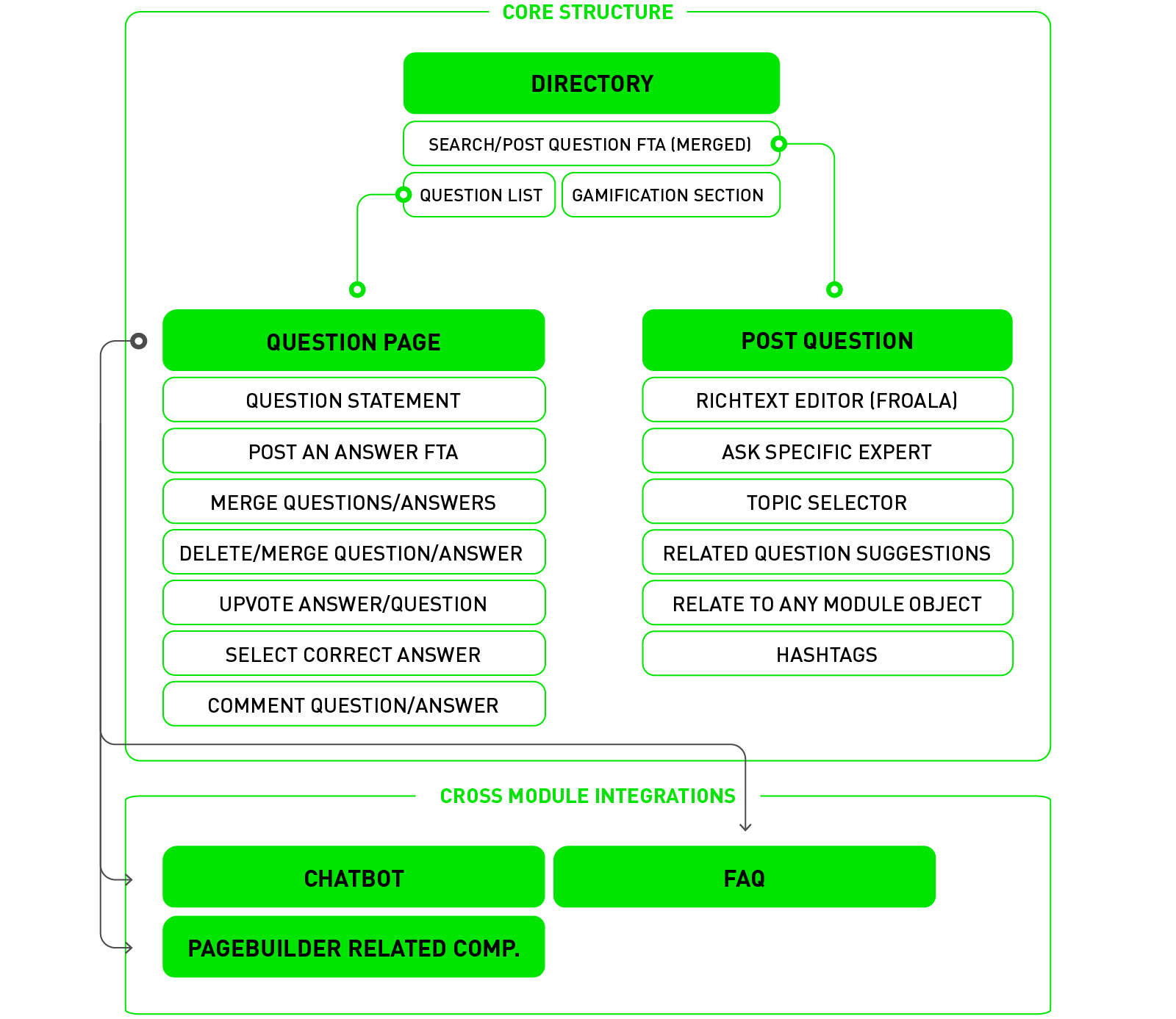
Ask the Expert is a community-based Questions and Answers module of DRIVE. It covers the fundamental Q&A mechanics, voting and comments on both questions and answers, gamification and community competition to keep people active, and integration across modules and instances.
DECISION
Q&A mechanics modeled on the best of Stack Overflow, Answeree and Quora, with correct answers feeding the chatbot assistant and the FAQ modules across instances.
EVIDENCE
Focus groups with 32 regular DRIVE users and 4 potential moderators shaped it, and usability tests ran before development. Shipped and used on every DRIVE instance.
Understanding the needs
The initial request was to let users on the platform ask questions that the community would actively answer. A secondary request was to feed the correct answers as source content into the chatbot assistant and the FAQ modules across all white-label instances.
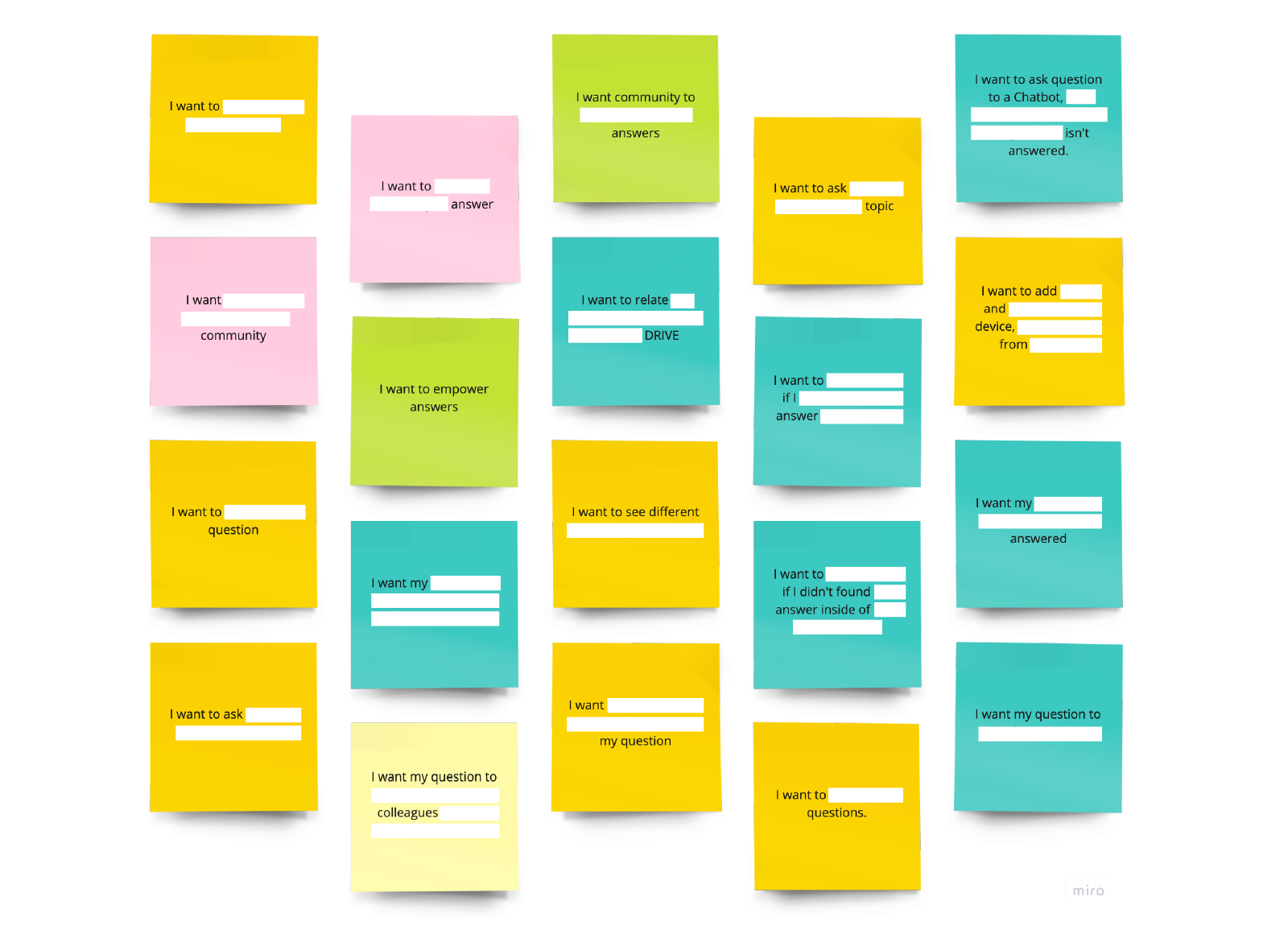
A briefing with the requesting parties gathered the high-level vision and ideas for the module. The resulting statements were sorted with an affinity diagram into groups and macro groups: Q&A mechanics (managing questions, answers and target groups), platform-wide integration and empowering activity. The groups were presented back and prioritized on a positioning map. This section focuses on the Q&A mechanics.
Desk research and benchmark
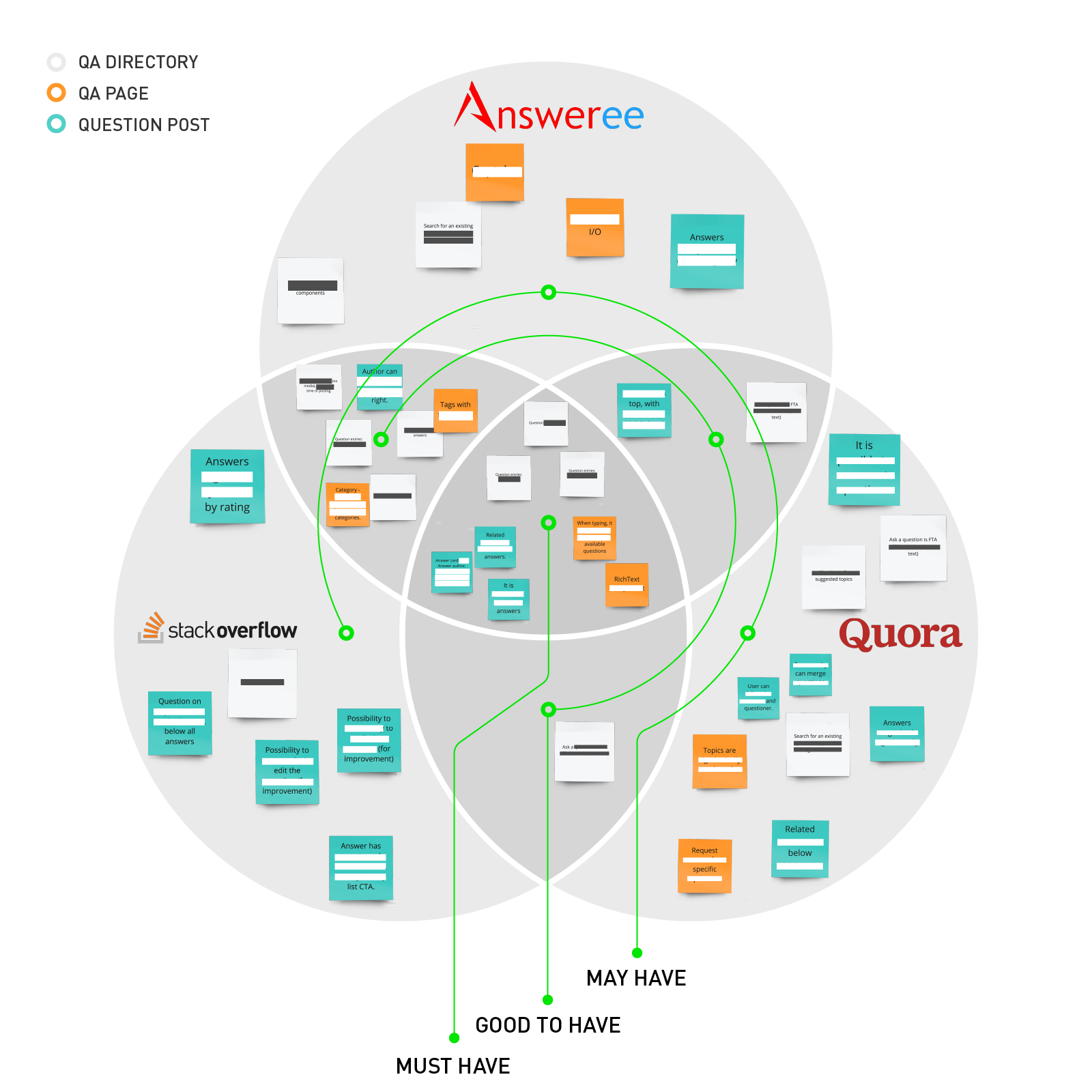
Desk research looked at similar community-based Q&A solutions to gather best practices from an established market. Three of the twelve products analyzed became the model for usability and features: Stack Overflow, Answeree and Quora.
Their functionality was broken down into three shared states: the Q&A directory (search and the list of questions), the Q&A page (the question, described and answered) and the question post (the posting mechanism). A Venn diagram sorted the attributes into must-haves (all in common), market-accepted (partly in common) and possible cutting-edge features (unique). DRIVE's own attributes were added on top of that list.
User research
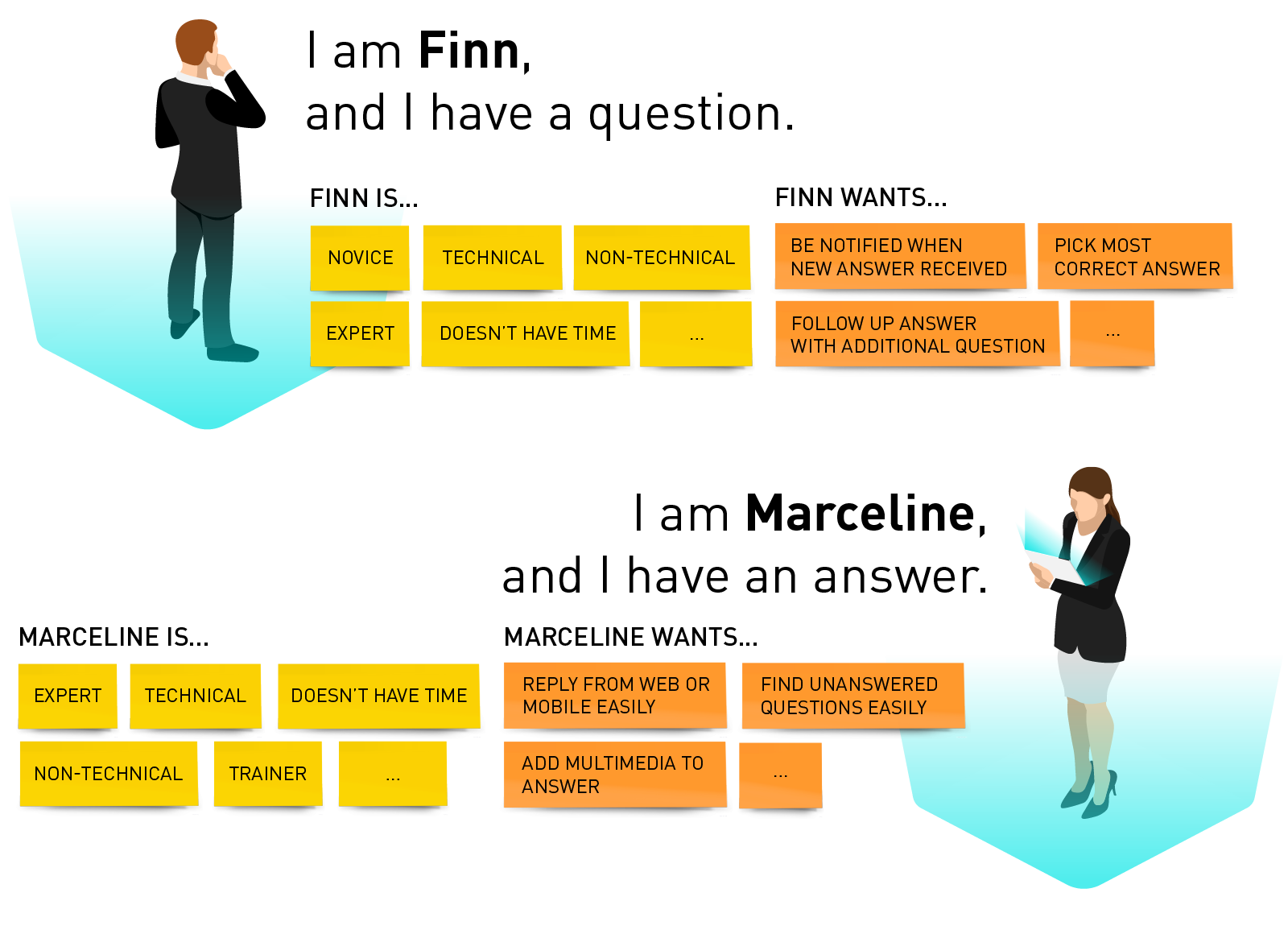
Four proto-personas covered each behavior: the questioner, who asks and receives answers; the casual explorer, who learns from questions already asked; the answerer, who answers them; and the moderator, who keeps the module in order. A CSD matrix on these personas became the basis of the questionnaire. Thirty-two regular DRIVE users and four potential moderators took part in the focus groups, and their pain points fed an empathy map, the problem statement and its sub-statements.
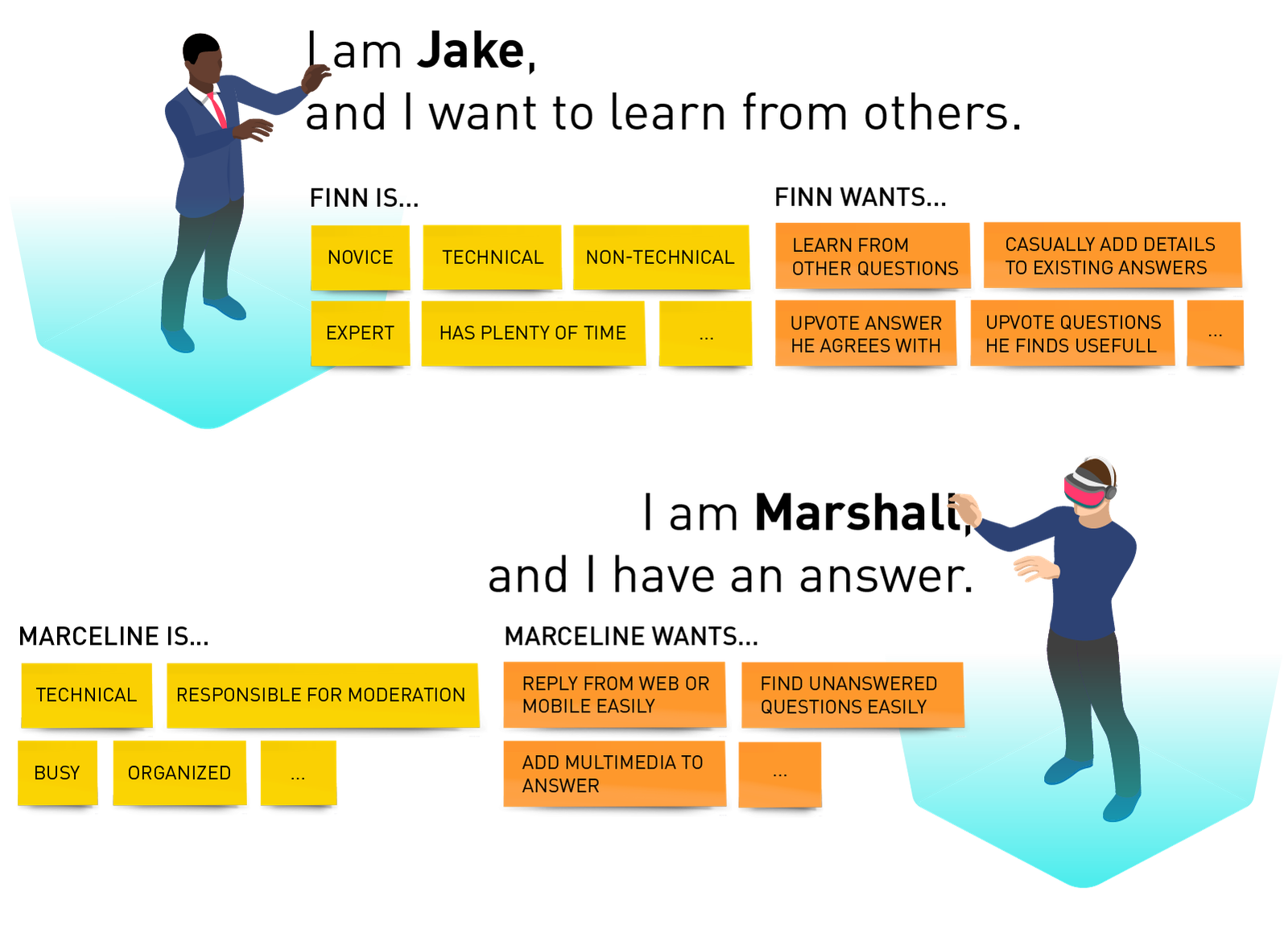
Ideation and prototype
Ideation with the internal team used the HMW method, with ideas sorted into macro groups that answer each problem statement. From these and the attributes learned in the benchmark, we defined the module's architecture and a user flow per persona. Finally, hi-fi interactive prototypes were built, and a fourth focus group ran usability tests on them and on the user journey before development.